> ## Documentation Index
> Fetch the complete documentation index at: https://docs.verbex.ai/llms.txt
> Use this file to discover all available pages before exploring further.
# Using Tools
> Learn how to enhance your AI assistant by connecting it with external tools and APIs
**What you'll learn**
* What tools are and how they work with AI assistants
* When and how to use different types of tools
* How to set up tools through Dashboard or API
# Understanding Tools in AI Assistants
Tools enable AI assistants to perform actions beyond just conversation. Your AI assistant can interact with external systems, APIs, and functions to perform specific tasks like:
* Booking appointments
* Sending emails
* Retrieving information from databases
* Transferring calls
When an action is needed, the AI assistant recognizes it, generates the appropriate function call, and sends it to the external tool for execution.
# When to Use Tools
Tools are particularly valuable in these scenarios:
## Task Automation
* Scheduling meetings
* Checking account balances
* Sending automated emails
## API Interactions
* Fetching user data from CRM systems
* Getting real-time information
* Updating external databases
## Real-Time Data Access
* Checking current stock prices
* Verifying travel availability
* Viewing calendar schedules
## Call Management
* Transferring conversations between agents
* Routing calls to appropriate departments
## Complex Workflows
* Handling multi-step processes
* Managing user authentication
* Processing complex requests
# Tools in Verbex Platform
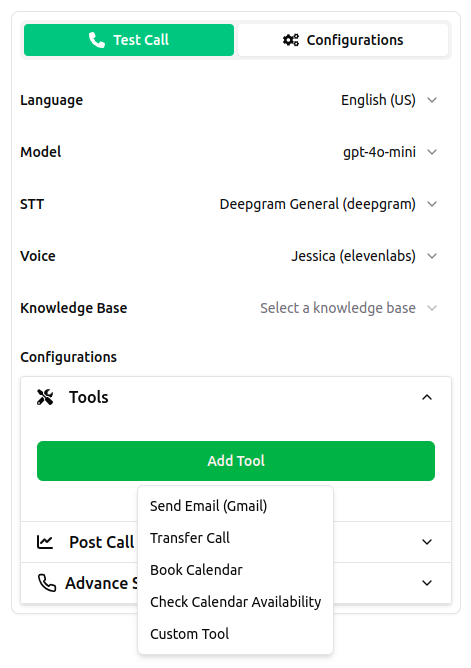 The Verbex platform offers two types of tools:
## 1. Built-in Tools
Pre-configured tools ready for immediate use:
* **End Call**: Terminates conversation when complete
* **Transfer Call**: Routes user to another agent
* **Send Email**: Automates email communication
* **Check Calendar**: Verifies schedule availability
* **Book Calendar**: Schedules appointments
The Verbex platform offers two types of tools:
## 1. Built-in Tools
Pre-configured tools ready for immediate use:
* **End Call**: Terminates conversation when complete
* **Transfer Call**: Routes user to another agent
* **Send Email**: Automates email communication
* **Check Calendar**: Verifies schedule availability
* **Book Calendar**: Schedules appointments
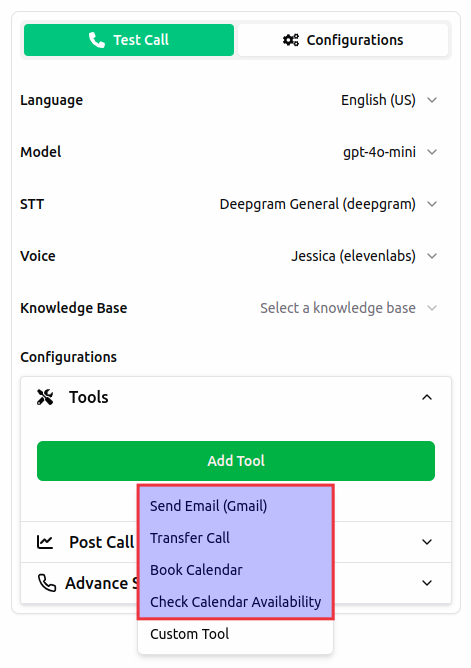 ## 2. Custom Tools
Create your own tools by connecting to external APIs:
```json theme={null}
{
"tool_name": "GetUserInfo",
"tool_description": "Get detailed user information from the API",
"endpoint_url": "https://api.example.com/getUserInfo",
"method": "GET",
"headers": {"Authorization": "Bearer token_value"},
"query_params": {"userId": "12345"}
}
```
## 2. Custom Tools
Create your own tools by connecting to external APIs:
```json theme={null}
{
"tool_name": "GetUserInfo",
"tool_description": "Get detailed user information from the API",
"endpoint_url": "https://api.example.com/getUserInfo",
"method": "GET",
"headers": {"Authorization": "Bearer token_value"},
"query_params": {"userId": "12345"}
}
```
 # Setting Up Tools
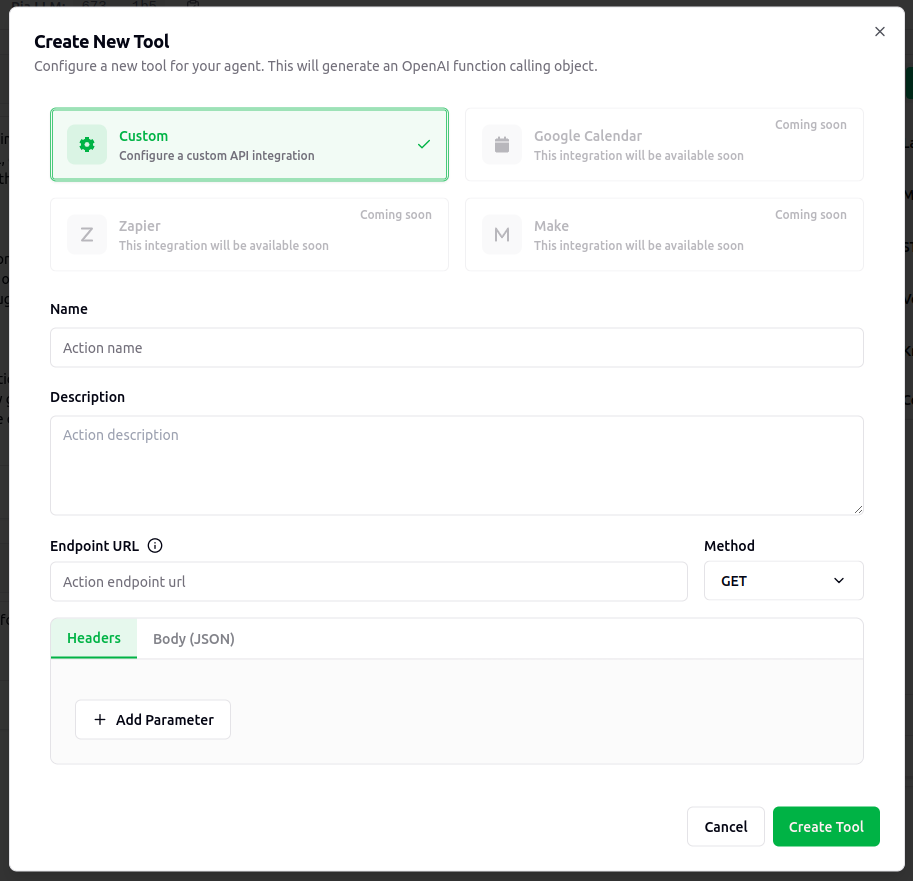
## Using Dashboard
1. Navigate to assistant setup
2. Select built-in tools from dropdown
3. Add custom tools by configuring:
* API endpoint
* Method
* Headers
* Parameters
## Using API
Configure tools programmatically:
```python theme={null}
tools = {
"built_in_tools": [
{
"tool_name": "End Call",
"description": "Terminates the conversation after completion",
"usage": "Called when task is complete or user requests end"
}
],
"custom_tools": [
{
"tool_name": "GetUserInfo",
"endpoint_url": "https://api.example.com/getUserInfo",
"method": "GET",
"headers": {"Authorization": "Bearer token_value"},
"query_params": {"userId": "12345"}
}
]
}
# Create assistant with tools
verbex.create_single_llm(assistant_info=assistant_info, llm=llm, tools=tools)
```
# Best Practices
## Clear Triggers
Define when tools should be used:
```python theme={null}
"If user asks for weather, call get_weather function"
"Once questions are answered, call end_call"
```
## Detailed Descriptions
Write clear tool descriptions:
```python theme={null}
"GetUserInfo: Retrieves customer details including name, email, and account status from CRM system"
```
## Parameter Formatting
Specify exact parameter requirements:
```python theme={null}
"user_id must be a string in format 'USR-XXXXX'"
"amount must be a positive number with max 2 decimal places"
```
## Performance Optimization
* Handle concurrent tool calls efficiently
* Keep the response of the tool as short and concise as possible. Include only the necessary information.
* Ensure the response time is as less as possible to avoid delays in the conversation
**Important Tips**
* Tools execute sequentially to avoid conflicts
* Backend should handle potential duplicate calls
* Always validate tool inputs before execution
* Monitor tool performance and usage patterns
# Setting Up Tools
## Using Dashboard
1. Navigate to assistant setup
2. Select built-in tools from dropdown
3. Add custom tools by configuring:
* API endpoint
* Method
* Headers
* Parameters
## Using API
Configure tools programmatically:
```python theme={null}
tools = {
"built_in_tools": [
{
"tool_name": "End Call",
"description": "Terminates the conversation after completion",
"usage": "Called when task is complete or user requests end"
}
],
"custom_tools": [
{
"tool_name": "GetUserInfo",
"endpoint_url": "https://api.example.com/getUserInfo",
"method": "GET",
"headers": {"Authorization": "Bearer token_value"},
"query_params": {"userId": "12345"}
}
]
}
# Create assistant with tools
verbex.create_single_llm(assistant_info=assistant_info, llm=llm, tools=tools)
```
# Best Practices
## Clear Triggers
Define when tools should be used:
```python theme={null}
"If user asks for weather, call get_weather function"
"Once questions are answered, call end_call"
```
## Detailed Descriptions
Write clear tool descriptions:
```python theme={null}
"GetUserInfo: Retrieves customer details including name, email, and account status from CRM system"
```
## Parameter Formatting
Specify exact parameter requirements:
```python theme={null}
"user_id must be a string in format 'USR-XXXXX'"
"amount must be a positive number with max 2 decimal places"
```
## Performance Optimization
* Handle concurrent tool calls efficiently
* Keep the response of the tool as short and concise as possible. Include only the necessary information.
* Ensure the response time is as less as possible to avoid delays in the conversation
**Important Tips**
* Tools execute sequentially to avoid conflicts
* Backend should handle potential duplicate calls
* Always validate tool inputs before execution
* Monitor tool performance and usage patterns